Showing posts with label bios. Show all posts

Setting BIOS for Installing Windows

Tuesday, July 15, 2014

BIOS (Basic Input Output System) is the first code run by PC when powered on. The primary function of the BIOS is to setup the hardware and load and start an Operating System. The first job for BIOS is to initialize and identify system device such as the video graphic adapter, hard disk, Optical Drive,  keyboard, mouse, and others hardware. In accordance with these opening words, I want to share about how to setting BIOS for installing Windows.

Step 1 When you turn the Computer on, press DEL or other key depending on the type of the motherboard to enter to the BIOS Setup.


Step 2 Choose boot menu then change the First Boot Device to be CD Room and the second boot is Hard Disk
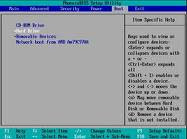


Step 3 Press F10 to save your BIOS Setting, and now your BIOS setting is ready to use installing Windows or Other Operating System

Only that the tutorial from me, good luck and hopefully useful....
Read More..

How to recover ACER BIOS Password

Sunday, July 13, 2014

  • Click the Start button
  • Click the All Programs menu item
  • Click the Empowering Technology menu item
  • Click the Acer eSettings Management menu item
  • Once inside Acer eSettings Management, click the Security button.

Sending a Computer to Acer for a BIOS Password Reset

Acer refuses to assist customers with BIOS password issues. The only option they discuss involves sending the laptop to them and paying a $100 fee.

 How to Reset an Acer BIOS PasswordHere is a copy of an email from Acer Support:
Thank you for contacting Acer America. I apologize for the delay in responding to your inquiry. In order to have the BIOS or hard disk password removed (This include any biometric security), the notebook will need to come in to our repair depot for password removal. This service is not covered by warranty and unfortunately there is no other recourse to remove a BIOS or HDD password from the notebook. The flat fee for BIOS password removal is $100.00 US dollars plus tax. If it is a BIOS or HDD password and you would like us to service it for you, please contact our telephone technical support line at 1-800-816-2237. Hours of operation are 7am-9pm CST Monday-Friday and 8am-5pm CST Saturday and Sunday, excluding holidays.

Resetting an Acer BIOS Password with Hardware

If the user cannot boot the Acer and does not want to send his/her computer back to Acer for an unknown amount of time, he/she can try to reset the BIOS password via hardware.
Forum members have reported that they were able to remove their Acer BIOS passwords by simply opening their notebooks and removing the CMOS batteries for 30 minutes.
Once the BIOS password is removed, press the key during POST (Power On Self Test) to enter the Acer BIOS setup.

Hope this help!!!
*** Taken from www.tech-faq.com ***
Read More..